First update since October and one more blog to become deserted? I hope not...
I am writing the theoretical part of my diploma thesis now, so there is not much to show here.
I switched to floating point rendering in Unity, which gives some nice results... but I had no time to tweak the shaders and settings. In about a month I will start working again on the project itself.
Some screenshots of my current status:


Writing the theoretical part
Tuesday, January 12, 2010 |
|
0
comment(s)

Video update & comments
Friday, October 23, 2009 |
|
0
comment(s)
Hello everybody,
Finally the comments work. At least they should. And I'd really like to hear your opinion about all this stuff. So... leave a comment!
I also added a poll on the right side. :)
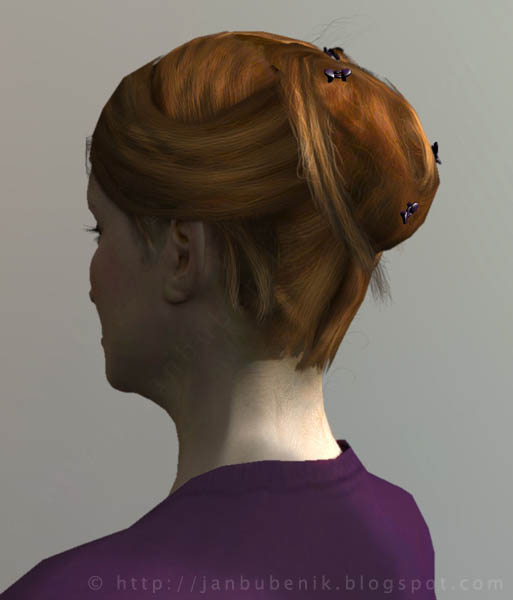
And a small update on the project. Here's a preview of the hair shader with a nice anisotropic specular:
I still got some difficulties with the depth-sorting of the hair (you can see some borders of the hair popping up and down). But more on this next week I think.
Dynamic normalmaps for faces
Monday, October 19, 2009 |
|
4
comment(s)
[update: included a short demo video]
 Normal maps are standard. It's a great and simple technique to simulate three-dimensional surface structure and details on low polygon object.
Often it's enough to have a static texture for that, but sometimes the surface changes in a way that can't be represented by joint moments or blendshapes, for example fine creases in cloth, wrinkles in skin and so on. For these things it would be nice, to have different normal maps which could be blended together at runtime. But how to do that?
Alpha blending for realtime hair
Saturday, October 17, 2009 |
|
2
comment(s)
With my project progressing, I finally have to take care about the hair.
All the rendering is based on polygons. But polygon edges are hard lines and hair is highly detailed and irregular. To get nice borders, some kind of transparency is needed. And here I ran into a problem, which I realized is well known, but has no real solution...
skin shading - stretch correction
Wednesday, September 30, 2009 |
|
0
comment(s)
Ok, a little update on the skin shading, especially the calculation of the stretch correction map.
OPENGL & DERIVATION INSTRUCTIONS
I encountered a problem with the implementation of the stretch-map rendering. I use the ddx() function to get the derivative of the world position in UV space, i.e. how much the world position changes from one pixel to the next. This way you get a nice approximation of the texture coordinate distortion. For more information about the whole process have a look at my previous post here.
skin shading - texture space diffusion - part 2
Wednesday, September 9, 2009 |
|
2
comment(s)
Interactive demo of my skin shader:
For older graphics cards I captured a video of the demo:
skin shading - texture space diffusion - part 1
Tuesday, August 25, 2009 |
|
0
comment(s)
I tried to improve the build-in shaders, to see if it would be enough for a decent skin shading. Often the specularity of virtual skin does not look right, so I decided to take care of that first. The standard shaders had only one fixed value for "shininess" per material and the specular intensity was not angular-dependent. So I extended the Bumped Specular shader to take an additional specular-texture, where the roughness is stored in the alpha channel and an fresnel term, that increases the intensity at very low angles.

Subscribe to:
Posts (Atom)
